MockingBird Prerequisites
This document uses words like VM, Nodes, Instance to refer a machine, Cluster to refer a Kubernete Cluster and K8s to Kubernetes.
You can setup MockingBird on any K8s Cluster, but we verified on Google Kubernetes Engine (GKE).
MockingBird Setup Requirements
Kubernetes Cluster
K8s Cluster - v1.26 and above
MockingBird platform can be setup at any of the following Kubernetes Clusters, including:
MockingBird Platform Setup Instance (JumpBox)
- JumpBox should be configured with Kubernetes Cluster access.
- Secure JumpBox to access your network infra, especially access to only K8s cluster.
- Here is the list of software packages to be installed at the JumpBox where K8s Cluster is accessible
Software
|
Persistent Volume creation
- Make sure the following PVC's are ready before you start the setup
Persistent Volume Claims
|
- If you are new to Kubernetes and not ready with above PVC's, refer to this document Volume Creation.
Capacity Planning
Adding an instance to the K8s workspace aids in the scalability of the mocking services.
Deliverables
WaveMaker team will share the following Google Cloud Platform (GCP) Service-Account file and SHA1SUM file of the MockingBird Helm Package.
- GCP service account file
- SHA1SUM file of MockingBird Helm Package
- MockingBird Version
IP Address and DNS Mapping
You will be needing IP Address for the following.
IP Address
- One static IP for accessing the MockingBird platform machine from the WaveMaker Platform network.
DNS Mapping
Map a domain to the above IP for easy access.
| Domain | Domain URL | Description |
|---|---|---|
| MockingBird Platform | mockingbird.[mycompany].com | This domain will be used to access MockingBird Platform APIs by WaveMaker Enterprise (WME) after integration |
In the preceding table, [mycompany] is used as an example. You may have to replace [mycompany] with your appropriate domain name.
Network Communication
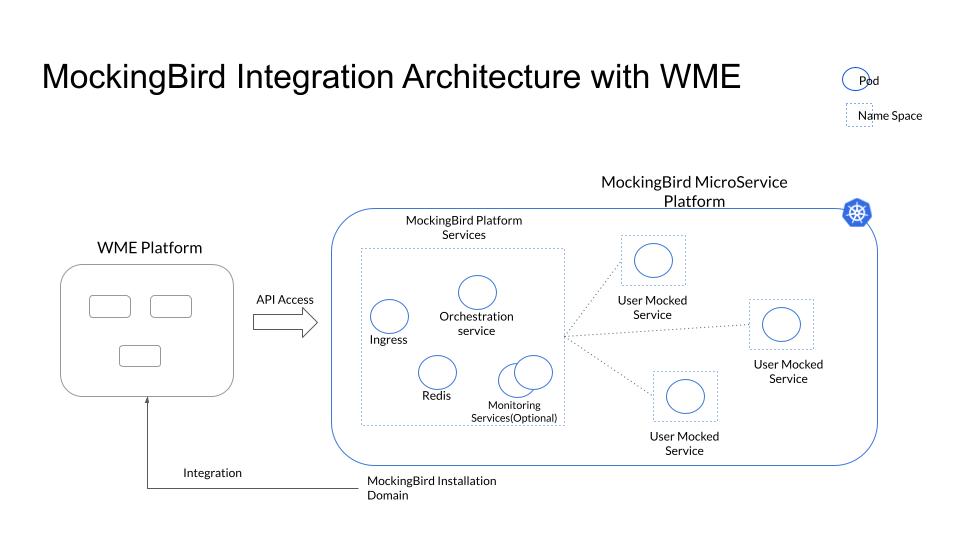
- Before you start installing MockingBird, make sure WME setup is ready.
- Below diagram explain's the network Integration between the WaveMaker Platform Instance and MockingBird K8s Platform. Make sure MockingBird Platform domain is only accessible to the WME Platform domain.